14.2 Plan and set up IT tools and devices for collaborative working.
INTRODUCTION:
This report will look at Collaborative IT tools and devices which are created to ease the working process for everyone by saving a lot of time and money, they improve the quality and results from your Content Marketing System (CMS).
The report will look at the purpose of collaboration tools to support a group of two or more individuals to accomplish a common goal or objective. In this report collaboration tools are both non-technological nature such as paper, flip charts, post-it notes or whiteboards and also include software tools and applications such as collaborative software.
There are three viewpoints of collaboration: communication, coordination and collaboration. These categories are often used to structure the variety of collaboration tools available. Communication collaboration tools allow to exchange information between individuals.
Although email is still the most common used tool in communication collaboration it is not very efficient on a big scale and other forms of communication seem to take over. Besides its flexibility it is not very well for group conversations as they grow too fast. There is no way to be sure that you have the latest version of a document that has been sent to you and it is impossible to always track via your email what tasks need to be done and by which deadline.
This report will look at benefits and limitations of different collaborative, the value of collaboration, ways to integrate different collaborative technology tools and devices for a range of purposes and Problem solving with Workplace.
2.1 Features, benefits and limitations of different collaborative IT tools and devices for work purposes and tasks.
Benefits:
Improved Efficiency

Perhaps the most obvious benefit of online work collaboration is an improvement in efficiency. While this benefit will impact any size organization, larger enterprise-level companies with complex processes and projects can experience the most dramatic improvements. Rather than wasting time searching through old emails or even paper documents to find critical information, team members are able to access all relevant project documents in a centralized location. When teams are aligned its easier to coordinate their efforts with the strategic goals of the company. According to PMI studies, organizations that align and coordinate their project management efforts to their business strategy “report 27 percent more projects completed successfully and 42 percent fewer projects with scope creep.”Collaborative tools also facilitate work on tablets and mobile devices, letting employees respond more quickly to requests and questions from colleagues or customers, no matter which device they’re using.
Better Time Management
Online collaboration makes it much easier for organizations to build teams that can work around the clock, by engaging team members in multiple geographic locations. For example, a software development team might consist of individuals based in Europe, North America and Asia, each working in 8-hour shifts and handing work off to the next team at the end of its normal business day. Sharing of this sort was challenging (if not impossible) in previous decades, due to the difficulties of transferring notes and status updates from one team to the next. Today, collaborative tools like Clarizen make it easy to store project documentation and other critical information in a single location, ensuring that every member of team knows exactly what has been done and what needs to happen next.
Lower Costs
Online collaboration can help companies reduce costs in several areas. Travel expenses are a perfect example – rather than spending thousands of dollars on airline tickets, hotels and rental cars in order to bring team members together, businesses can use collaboration software to help teams work virtually, either from their homes or local offices. Companies can also lower their expenses by using collaborative work management tools to engage lower-cost resources (such as offshore employees) to perform tasks that would otherwise be handled by outside contractors or higher-cost employees.
Improved Quality
Teams that work collaboratively tend to produce higher quality work, because team members are able to work together to identify potential problems and find solutions more quickly and effectively. Team collaboration helps each employee or partner contribute in the area of his or her special expertise, reducing the opportunities for mistakes or oversights and leading to better overall project outcomes.
REPORT:
The results showed that collaboration leads to increased business and operational performance, in addition to innovation in the form of products, services, processes and technology. Most strikingly, the results suggested that this positive relationship is statistically higher for organisations that are BS1100 certified compared to the firms that are not certified. We were also able to group the respondents according to their familiarity with the principles of BS1100 (shown as ‘Formalization’). The firms that were familiar with the principles of BS11000 had a higher performance in terms of business and operational performance and were more innovative. The overall relationships between collaboration and outcomes can be seen in the figure below.
“Value probably isn’t easy for us to quantify. I mean we don’t have
any particular measure that I’m aware of in our business that says,
you know, this is how… this is the measure that reflects the benefits of
collaboration. I don’t think it’s quite that straightforward. There are things
like the financial benefits that you could easily pick out, but there are other
things, such as the relationships, the communications, and the general
cultural improvement that comes from a collaborative arrangement that
aren’t easy to measure”.
“Our biggest challenge was socializing collaboration among our staff, among
our team. So doing more than ticking the boxes, and actually embedding the culture in
the organisation, and keeping that momentum up so that teams have an awareness and
understanding. It’s impossible to just have one or two people responsible for this and it has to be embedded in our entire relationship management function.”
What actually constitutes a collaborative culture is still not readily defined. The flexible and dynamic nature of interactions and relationship makes this very difficult to systematize, measure or quantify. The next most commonly cited challenge was the lack of experience and skills that are necessary to embed collaborative working practices.
“The value of collaboration is mutual benefit.”


“Despite obvious benefits to collaboration, such as cost sharing and risk sharing,
higher level of cooperation in joint learning and innovation is difficult to achieve. Collaboration actually results in business performance in terms of cost and revenue realization. Whilst it is known that collaboration delivers value.
Cross-team collaboration in the workplace is a critical aspect when it comes to performance and productivity on any project. It not only inspires innovative approaches to a project but also leads to quick decision making. With the growth of video conferencing systems and software, employees can now collaborate from anywhere at any time using minimal resources.
But just like any other office process out there, online collaboration comes with a set of advantages and disadvantages. Determining these pros and cons can help a business to draw an action plan to overcome the challenges and hurdles that may come up along the way.
Advantages of Online Collaboration
1. Convenience in Organizing Meetings
One of the key advantages of online collaboration is that it makes it easier for people who aren’t in the same location to work together. Most companies have branches and/or offices in multiple cities and countries. And to ensure those working on a given project are informed and engaged, the use of online collaboration software is important. For instance, EzTalks Cloud Meeting can allow up to 500 participants to join in a meeting and listen to the presenter at once. With such a huge meeting capacity, company employees can effectively call for a meeting and collaborate with one another, regardless of their geographical differences.
2. Easier Management of Projects
With the ability to convene a meeting at anytime from anywhere, online collaboration makes it easier to manage team projects. For instance, when introducing or analyzing a new company product, the production team may need to work with other departments like Research & Development (RD), marketing and sales. Online collaboration software provides an ideal platform for all these players to engage in meaningful discussions about the proposed product. That means the person in charge of the product department can generate a report quite seamlessly and submit it to the bosses within the set timelines.
3. Faster Completion of Projects
When different stakeholders are involved in a given project, each of them is likely to give the best input in terms of expertise. A collaborative team that recognizes its synergies can have excellent viable solutions shared quickly and decisions reached in time. Once the conclusions have been tabled, presented to the bosses and approved, the next phase will obviously be implementation. Online collaboration can particularly fuel faster completion of projects since project stakeholders can meet and interact online without experiencing time constraints and inconveniences.
4. Significant Cost Savings
If those participating in a meeting are many, it can sometimes be a challenge to find a physical space that can accommodate everyone. Online collaboration software allows businesses to host online meetings in real time with hundreds of participants interacting simultaneously. Employees can actually call for urgent meetings and discuss important project issues using the minimal resources. It doesn’t really matter whether one is at home, on the road or in the office.
EzTalks Cloud Meeting provides users with innovative whiteboards and screen sharing options that make collaborative sessions even more engaging. The use of tele-presence video conferencing particularly simulates the real-life meeting rooms, which makes mastering facial expressions and body language easy. With such robust online collaboration solutions, there’s no need to book flights, hotel rooms or meeting spaces. Online meetings can simply be organized and disseminated instantly over a virtual meeting room. In the long run, a business utilizing online collaboration will experience improved performance and productivity while enjoying significant cost savings on communication.
Disadvantages of Online Collaboration
1. Lack of Face-To-Face Interaction
While online collaboration through video conferencing provides real-time communication between people, it lacks the aspect of face-to-face interaction. For instance, meeting participants cannot argue with one another simultaneously over the online platform because of longer lag times. That may sometimes limit the level of engagement of the employees in an online meeting. And when the quality of video stream is poor, it’s difficult for meeting attendees to decipher facial expressions and body language of the presenter.
2. Possibility of Network Failure and Equipment Breakdown
Online collaboration might provide a range convenient and efficient meeting options but network failure and equipment breakdown might limit its use. Participating in online collaboration meetings through video conference also requires the use of huge data bundles, which can be limiting to some attendees. Running out of data bundles leads to disconnection from the internet, which bars attendees from participating in collaborative efforts of finding solutions to a project. Meeting interruptions due to any of these reasons may cause a cross-collaboration team to work beyond the scheduled timelines in order to complete the project. That can delay project discussions and subsequently decision making, which might have significant cost implications.
3. Language and Cultural Differences
The use of online collaboration software has made it easier for companies to bring together employees from different countries to collaborate in a given project. While that might be a good strategy to improve performance, differences in language and culture can limit the engagement of employees working in different regions. That means online collaboration cannot offer meaningful solutions in this case.
4. Incidences of Group Think
Bringing stakeholders from different departments and region to work together may undoubtedly inspire fresh perspectives on the project. However, there is always the threat of group think, where stronger personalities may take over the discussions, persuade and supplant the ideas of others. Such online collaborations might lead to the bosses believing the outcome is a group effort yet it’s something that was agreed upon by a few. That might end up lowering the performance of a project as important ideas may be left out in the process.
Conclusion
While the benefits of online collaboration are many, there are potential drawbacks that come along too. That does not mean companies should avoid adopting the online collaboration software. Rather, they should seek to understand how applicable the software is to the business. The effective use of online collaborations basically depends on how the business analyses the problems and the strategies it puts in place to eradicate them.
By adopting online collaboration software, a business can take advantage of convenient hosting of meetings, swift project management and improved savings on communication. But in order to keep the system working, the business should focus on fixing the issues of quality video streaming, internet/software breakdown and language and cultural barriers. This is all any size of business needs to do.
EXAMPLE:
Features, benefits and limitations of different collaborative technology tools and devices.
Mobile Computing Devices
Examples: Laptop, smartphone, tablet
Benefits: – Communication Anytime, Anywhere
– Entertainment
Limitations: Security because there are a lot of hackersHeadset
Examples: Headphones, Bluetooth headset, Gaming Headset
Benefits: -Talk when driving anytime
-Allows for hands free use
Limitations:The range on headsets is extremely limited
Content Management software
Examples: Google, Microsoft, icloud
Benefits: – You can use it anywhere e.g. on your phone
– Files are secure and accesed whenever
Limitations: Maintenance costs (it costs a lot of money)
Forum:
Examples: BMW, Land Rover, Audi
Benefits:– Build relationships with visitors
– Gain more creditability.
Limtations: Involve a tremendous amount of work to get them startedVOIP (Voice over IP) Software
Examples: Skype, MSN Messenger, ICQ
Benefits: – Low cost
– Call forwarding, call waiting, voicemail, caller ID and three-way calling
Limitations: The quality or connections is sometimes not high.
2.2 Determine IT tools and processes needed for archiving the outcomes of collaborative working.
The types of work being done; the kinds of employees performing such labor; workers’ expectations, routines, and practices; and the tools being used to complete tasks of all sorts are being revolutionized at a dizzyingly fast pace.
Systematic workforce – the collaborative working help in making much easier the working process in the industries, affects in better productivity.
Key developments:
Workforce Demographics
Changing Nature of Work
Continued Technical Innovation
There are currently five different generations of laborers working together simultaneously; this dynamic will persist into the foreseeable future, there by guaranteeing a rather “mixed” workforce for some time to come.
These five generations consist of “Traditionalists” (born pre-1946), “Baby Boomers” (born 1946–1964), “Gen Xers” (born 1965–1976), “Millennials” (born 1977–1997), and “Gen 2020ers/Gen Zers” (born post-1997).
Millennials are undeniably exerting the strongest influence on the changing nature of work right now.
They’re the latest generation to enter the workforce mass; they’re also the largest generation in history as well as the largest in both the U.S. and Canadian labor markets as of 2015.
Research suggests that in comparison to previous cohorts, Millennials:
- Expect and seek out greater flexibility and choice in the workplace, regularly demonstrating their willingness to continuously change jobs until they find something with which they’re fully satisfied.
- Expect instant access to information, immediate feedback from superiors, the ability to express their opinions honestly and openly with those with whom they work, and opportunities to engage in personal development and career advancement whilst working.
- Represent the first generation of “digital natives”: having grown up in the Age of the Internet, “technology has become completely unified into the everyday life of millenials”
- Are heavily involved in the tech sector, having founded some of the most successful startups of the 21st century (including Airbnb’s Brian Chesky, Facebook’s Mark Zuckerberg, Instagram’s Mike Krieger and Kevin Systrom, and Lyft’s John Zimmer)
- Are fundamentally committed to integrating the use of technology into virtually all aspects of their work, routinely indicating (e.g., in surveys) that the presence/absence of state-of-the-art technology at a place of work significantly influences their decision to take a job.
As Millenials continue to exert more of a profound influence on the size and shape of the workforce, businesses must remain committed to adapting their values, philosophies, and operations to the unique needs, expectations, and skills of this generation.
Modern workers, and Millennials in particular, expect their employers to provide the (physical and digital) infrastructures through which employees can easily, instantly, and remotely collaborate with each other.
It is, thus, crucial for businesses in the software industry to understand, and evolve their operations and products in line with, the changing nature of workplace collaboration.
The dynamics of modern labor — increasingly remote, automated, and outsourced; technology-centered; digital in orientation; highly interdependent and complex; and unstructured — are forcing businesses, especially those in tech, to place ever-greater emphasis on collaboration.
“Collaboration” can be defined as a “cooperative arrangement in which two or more parties…work jointly towards the achievement of a common goal”.
“As the modern workplace evolves…so too does workplace collaboration. Businesses are rethinking how employees can collaborate at a time when more employees work remotely and teams are naturally more dispersed. In turn, they must develop the most effective methods and tools for workers to use in a more digital environment. …
As today’s workers demand more flexibility and freedom to choose how, where and when work gets done…companies must provide technological resources that empower an efficient digital work environment … and that mirror the engaging and intuitive experiences workers enjoy on consumer devices during personal time”.
It’s no secret, of course, that effective collaboration in the workplace is essential to growing a successful business.
Points out that not only does technology-led collaboration generate greater opportunities for innovation and creative problem solving but it also “serves up a competitive business advantage in terms of what highly productive teams are able to accomplish”.
Indeed, research shows that effective workplace collaboration leads to increased productivity, which encourages a whole host of positive outcomes, including:
- Streamlined operations;
- Reduced costs;
- Enhanced cohesiveness among teams;
- More engaged employees;
- Greater employee retention rates;
- Better customer experiences;
- Increased referrals;
- A significantly better bottom line;
Indeed, digital collaboration is indispensable to modern businesses, as are the talented developers who create the frameworks that make such collaboration possible.
Indeed, technological advancements in Internet-based social interactions have ushered in revolutionary changes to the ways in which modern employees work together and collaborate.
These new technologies provide workers with previously unheard-of freedom to work anywhere, any time, and with anybody. Examples of popular cloud-hosted apps and platforms include Amazon Web Services, Basecamp, Box, DropBox, Evernote, GitHub, Gmail, Google Cloud Platform, Microsoft Office 365, Skype, Slack, and Trello – CLOUD-Based platforms allow the workforce to share any time, everywhere with everyone. Removes the limitations.
- Cloud-Based tools are now more integrated into business operations than at any other time in the past; and
- Employees now rely more often on social methods of communication (e.g., mobile-based messaging) than on traditional methods of interaction (e.g., telephone calls) in their work.
The report reveals that “45 percent of respondents say social technologies are very or extremely integrated into day-to-day work at their companies, up from one-third who said so one year before”. Improve the business results.
Importantly, the increasing use of such freedom-enhancing technologies, with their capacity for real-time communication and cooperation, seems to be changing the nature of work for the better, making it more collaborative, streamlined, and efficient.
The report’s data also show that the increasing use and relevance of social tools is occurring across a wide range of business operations and functions. These include public relations (PR), recruiting and hiring, customer relationship management, procurement, supply-chain management, and after-sales services.
According to executives, the benefits of enhanced integration of cloud-based apps and platforms include:
- Improved communication (and reduced communication costs);
- Enhanced collaboration (both internally and externally); and
- Greater capacity for self-organization among employees.
On the one hand, cloud-based technologies have thoroughly transformed modern work for the better, making it easier and less frustrating for employees to collaborate on projects, share ideas and problems, receive real-time updates on developments, and operate with enhanced autonomy and freedom.
The “silo mentality”, which underlies this approach to business, refers to:
“A mind-set present in some companies when certain departments or sectors do not wish to share information with others in the same company. This type of mentality will reduce the efficiency of the overall operation, reduce morale, and may contribute to the demise of a productive company culture”.
As Steve Olenski succinctly puts it, “the problem with many collaboration tools on the market today is that they…only offer stand-alone functionality, creating the need to open several applications at one time”.
Though existing social channels are effective, they could be made more effective if they were to be embedded within one easily-accessible application. In this scenario, never again would an employee have to leave the application he or she is working within to accept a calendar invite, to respond to an email, to ping a coworker or to initiate or join an audio, video or Web conference session”.
We’re developing a powerful and versatile framework that “sits on top of” any existing web-cloud-based application and instantly adds real-time communication and collaboration features. This all takes place without forcing users to launch (and learn) one or more new programs. It’s what today’s tech workers want from software developers and it’s what you, therefore, should be incorporating into your software packages.
STATISTICS:
A 2015 report by Dimensional Research and Alfresco asked 750+ North American and British knowledge workers from a wide range of industries, company sizes, departments, roles, and age groups for their opinions on contemporary collaboration trends and technology developments.
The study discovered that:
- 59% of respondents (including 71% of Millennials) experienced difficulties or challenges using their current workplace collaboration tools; and
- 21% cited the lack of consistency in tools used and exclusion of key stakeholders, 18% referenced the inability to easily measure worker contribution, 17% referred to outdated documents, and 16% pinpointed difficulty assessing when a task has been completed as the primary reasons for dissatisfaction with workplace collaboration.
Using half a dozen or more standalone apps in an attempt to facilitate effective communication between and cooperation among different people introduces unnecessary friction into the entire collaboration process. It also discourages the kind of open communication and instantaneous back-and-forth sharing of feedback that today’s workers increasingly demand.
Geoff Thomas puts it perfectly when he states:
“In the workplace of the future employees want to work smarter, not longer”.
Many workers today, especially those of the Millennial generation, are becoming ever-more hesitant to using formal project management software.
Rather, they expect to be able to use their personal devices and preferred pieces of software at work without experiencing drops in performance (such as unnecessary increases in friction).
As Geoff Thomas says, “They want a single platform to run both their work and personal lives”
“Combining content and communication into a single, seamless experience — word processing, spreadsheets, chat, checklists, live editing and much more. Everything will happen in one place, vastly reducing the need for teams to send long email threads with clunky attachments, or waste time in endless meetings”
…or, dare I say, simultaneously use half a dozen apps in order to accomplish what should be simple workplace tasks.
We’re developing a framework that allows software developers to easily, transparently, and efficiently create collaboration-rich apps that their users will love.
If you’re building the next Quick Books then why should your users be forced to add a chat program, a video calling app, additional file sharing software, and various other apps just so that they can communicate and work alongside each other?
2.3 Summarize ways to integrate different collaborative technology tools and devices for a range of purposes, tasks and communication media.
The Digital Workplace
In today’s digital age, effective collaboration is increasingly achieved via the digital workplace.
Step Two Designs defines a digital workplace as a holistic set of workplace tools, platforms and environments, delivered in a coherent, usable and productive way. A digital workplace is a place, that empowers individuals, teams, colleagues, clients and partners to share, communicate and collaborate with little to no friction, delay or challenge; allowing all these stakeholders to perform their jobs more effectively.
There are a range of digital collaboration platforms, systems and tools an organisation can and should utilize, whether it be a standalone enterprise collaboration tool or a full content management system (CMS) with a range of functionality to achieve additional business goals, such as a corporate intranet hub, with social intranet tools.
Here are some examples of enterprise social networking tools that you can consider:
- Team work spaces
- Company wiki
- Forums
- Blogging
- Instant messaging
- Facebook-like profile pages
The benefits of collaborating using the above are fairly obvious.
Employees from different departments can add to the company wiki pages, offering a comprehensive and easily accessible resource for everyone within the organisation.
Understanding Enterprise Apps
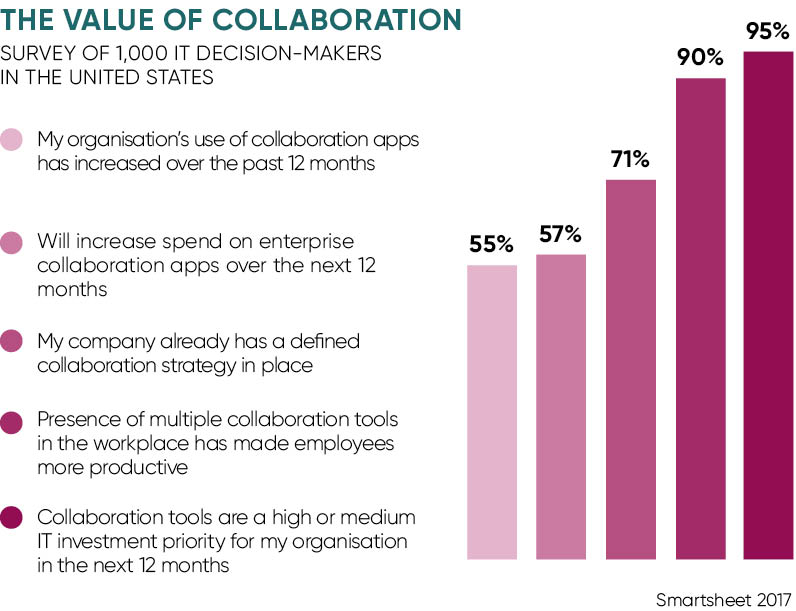
The business world is changing, whether it likes it or not, and soon we will also begin to see organisations building bigger communities which can be accessed from apps by the workforce. According to a Gartner survey, 79% of surveyed organizations plan to increase their mobile spending by 36%. Not surprising considering mobility results in increased employee output, less inventory and fewer operational expenses.
The great news is a good CMS can help bring this about. Whilst it’s thought that many enterprises will eventually have their own app stores, this isn’t essential. There are many reputable app developers around who are creating white label apps, which can be added to the company CMS, complete with branding and the addition of bespoke content.
The Rise of Remote Workers
Another consideration for using collaboration tools is that more employees are choosing to work from home. According to research carried out by Dell and Intel, more than half of all global employees believe that they are more productive when working from home than their office-based counterparts. 46% of those that work from home also said that they suffer less stress than they do when working in an office.
For example, with one simple, secure login, an employee can connect to the office and work just as effectively as if they were there in person.
Again, this leads to a happier workforce, which leads to greater productivity and that feeling of being a part of a larger family, which all have the same interests.

The Need for Knowledge Management
To facilitate knowledge sharing is to ensure that it is retained within the workplace, and shared among employees to help them work more effectively together. According to Gartner, “Knowledge management is a discipline that promotes an integrated approach to identifying, capturing, evaluating, retrieving, and sharing all of an enterprise’s information assets. These assets may include databases, documents, policies, procedures, and previously un-captured expertise and experience in individual workers.”
It ensures all relevant information and resources can be access by employees when they need it. Organisations must give employees the tools to ensure that they can share the knowledge they possess. This all leads to faster and more effective decision making and easier collaboration.
Enterprise Branding
Branding is one of the most important aspects of any organisation. A brand represents the sum of people’s perception of the organisation, including those of their employees. A great brand not only communicates the organisation ethos instantly to employees, it can inspire them to go the extra mile as they are proud of the organisation they work for.
Therefore, collaboration tools within a CMS should be fully branded with the company logos, text, colours and so on, offering uniformity across the board. If there are a number of offices using a CMS, it is a good idea to ensure that the solution is consistently branded so that employees share the same experience regardless of where they log in from.
Of course, functionality is even more important, but in today’s world, it pays to develop a strong brand.
Document Sharing
Likewise, document sharing is so much easier than it used to be and it’s no longer necessary to shuffle important documents backwards and forwards with edits by email or hard copy. A cloud-based CMS will mean that documents and projects can be stored so that they are accessible to everyone working on the project at the same time. This is great news for today’s workplace, where employees and partners tend to be scattered around the globe.

Video Conferencing
Video conferencing is again, rising in popularity and has a number of uses for the larger company and small organisations alike. Not only can it be used effectively for collaboration, it can be used for board meetings, webinars, video content management and more.
Basically, it’s another tool organisations have at their disposal that can make everyone’s job easier while reducing costs. Expensive business trips for conferences and meetings can be reduced and productivity increased as workers are capable of doing everything from the office.
It can’t be emphasized enough how much CMS and collaboration tools can benefit workplace collaboration. They save time and money and lead to better growth for any organisation which uses one.
This is where online collaboration tools can help teams achieve productivity goals. These tools increase team efficiency by up to 20%, making it easier for teams to work together towards common goals. Collaboration is deemed so important by modern employees that up to 40% would pay for their own tools to make their jobs easier.
The Different Types of Collaboration Tools
Enterprise collaboration tools are designed to make it easier for employees to share information, connect with each other, and work together. Though there are many all-in-one collaboration platforms available such as intranets with social tools, they generally fall into three categories:
1. Communication tools
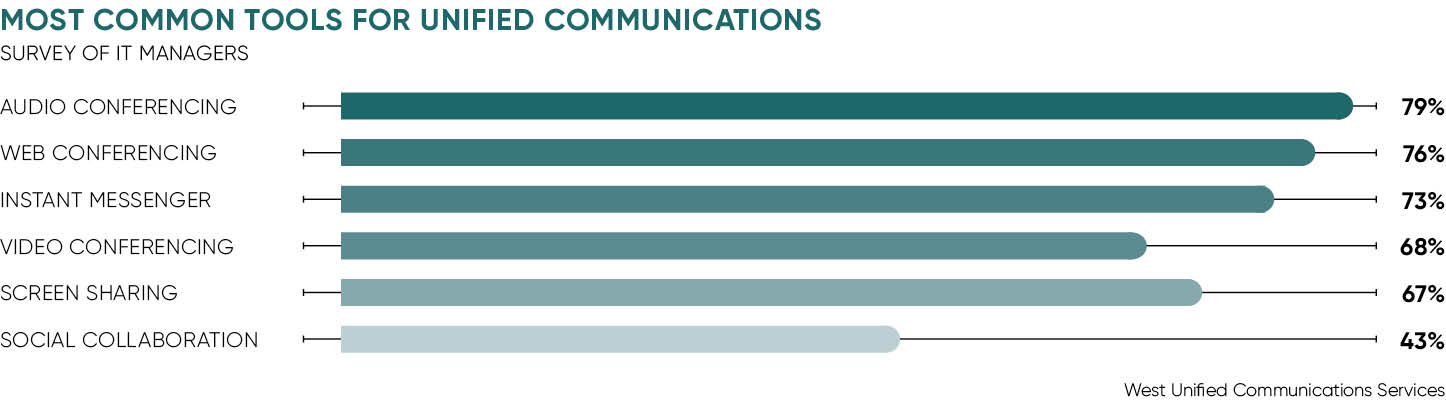
These are designed primarily to facilitate communication, whether it be one-on-one or in large groups. In the modern office, there are a multitude of ways to communicate with other employees: text message, voice calls, emails, instant messaging, team work spaces and more. A communication tool seeks to combine these into a single enterprise social network so that it is less likely that employees will miss each other. Communication tools can even be tied into voice-over-IP systems to create an even more seamless environment.
2. Conferencing tools
Video chatting and voice conferencing have become very important to the contemporary workplace, in which employees will often work remotely and need to connect with other offices. A conferencing tool makes it easier to seamlessly connect to other offices with high quality communications.
3. Coordination tools
Coordination tools are often thought of as „project management“ solutions. These are tools that drill down to employee tasks, goals, and milestones, giving them a better picture of what they need to complete next. Ideal coordination tools will keep all team members on the same page while also giving supervisory staff an easy-to-access overview of the project status. Some advanced coordination tools can even track employee productivity at a granular level, giving insights into which team members work on which aspects of a project best.
Though the earliest collaboration tools were used on internal networks, modern collaboration tools are almost universally used online. Not surprising as it makes it easier for employees to connect to each other from out of the office; employees no longer need to be on the same network to communicate.Additionally, many are built across cloud-based frameworks, giving them access to resources that they wouldn’t otherwise have.
Choosing the Right Online Collaboration Tool for Your organisation
All organisations can benefit from using tools for workplace collaboration – but with hundreds available, which ones should you use? There isn’t a single one-size-fits-all solution; instead, organisations need to pare down to what they truly need. Here are a few questions to ask.
What are your organisation’s challenges?
Does your organisation find itself struggling with team communication? Or is it having primarily organisational difficulties? Your organisation’s challenges should be the driving force behind new platform adoption.
What is the size of your team?
Smaller teams are going to find themselves looking at different solutions altogether than larger enterprises. Collaboration tools for smaller workplaces and teams tend to be simple and streamlined, whereas enterprise solutions are going to be significantly more complex.
What is everyone’s role and responsibility?
Often there is a failure to establish roles and responsibilities as well as failed management schemes for your platform. Ask yourself, how exactly they will be collaborating with others. Ideally, there are three points you can consider:
1. Role assignments for users which may include administrator, editor or viewer role
2. Responsibilities for those roles as well as project managers, team leaders and other members
3. Governance of the platform which includes the security and administrative rights
What is your organisation’s budget?
Most online collaboration tools are available at a low monthly subscription cost — but there are also some open source platforms available for startups and organisations that aren’t ready to commit. Professional solutions are often priced out at a per seat rate, so it becomes important to compare different tools based on cost.
What is your current IT infrastructure?
Ideally, your organisation’s new collaboration tools should be able to easily integrate into your existing IT infrastructure. There are many popular suites that are designed to do just that, working directly with not CRM systems, ERP solutions, and general office products.
What document auditing and processes is needed?
Document auditing should be part of your overall plan. This involves cleaning up hard drives and migrating important and useful files to your platform. This plan should include the methodical process for the move, the list of documents which should be labelled as still working and archiving of those which are already finalized. Out with the email-driven processes like document sharing and editing and in with cloud storing and real-time revisions. Including this in the plan of your organisation will help streamline the process of document viewing, editing, publishing and distributing.
What level of mobility and accessibility will you offer?
Mobility and accessibility is one of the key reasons for implementing a collaboration tools. It is recommended that you document processes for users. When users are obtaining remote access to the platform, they will feel confident that they know how to complete a process.
Online collaboration platforms give an organisation an extremely powerful method of consolidating employee communications and helping them in collaborating with others. By investing in collaborative tools, organisations are able to improve upon all levels of their productivity and efficiency — and therefore improve upon their bottom line.
Need more information on mastering collaboration in your digital workplace? Our online collaboration guide outlines the information on establishing better collaboration procedures and optimizing your existing ones. You will find key insights into common collaboration challenges and strategies and tools to overcome these. Along the way we’ll also look at how to measure effectiveness.

01. SLACK
What began as a messaging tool for video game developers has evolved into the full-service collaboration platform we now call Slack. It presents a single unified archive with a search function and integrates with popular services such as Twitter and Dropbox. Slack has also built an ecosystem of partners, chat bots and integrations for additional functionality. Most popular for its ability to counter the reply-all e-mail chain scenario that most of us know all too well it provides persistent chat rooms or channels organised by topic.Teams who use Slack claim to see an average 48.6 per cent reduction in internal e-mail.
02. CHATTER
Salesforce Chatter is essentially an enterprise-level social network for employees to connect with each other and with their customers and partners. Built with a Facebook-style interface, the software provides access to files, business processes and document collaboration functions. Users can use an @mention tag to flag posts. Salesforce designed Chatter to be used both with mobile devices and on desktops. The product comes standard with a set of Salesforce apps and integrates with most third-party software, such as SharePoint, Google Drive and Box.
03. TRELLO
This web-based project management application was designed to make project collaboration as simple as possible. Overarching projects are set up as boards and members can add cards for individual steps or tasks, assigning them to those involved, prioritizing, and adding timelines. Flexible, easy to use and visually attractive, it can be used across a range of sectors, from software project management and web design to law office case management and lesson planning.
04. ASANA
Founded in 2008 by Facebook co-founder Dustin Moskovitz, Asana is designed to help teams organise, track, and manage their workloads, making it easier to collaborate and work on joint projects. Slickly designed, this software-as-a-service allows teams to create projects, assign work to teammates, set deadlines, and chat about specific tasks, all in one tool. It also comes with a suite of reporting tools to help members monitor project progress.
05. HARVEST/FORECAST
Harvest is a web-based tracking tool, which allows you to the time and budget your team members spend on individual projects or tasks. It also has invoicing and reporting capabilities so that clients will receive automated payment reminders rather than managers being required to chase via email. Harvest’s complementary application, Forecast, is a visualization tool which helps teams map out plans so that you can check how available coworkers are at a glance. The perfect collaborative replacement for lengthy spreadsheets.

06. G-SUITE
Google’s full gamut of cloud computing and collaboration tools. The true value of G-Suite is simply the comprehensive range of interconnected tools – from email and calendar, to docs and sheets, to Google hangouts. Perfect for startups and SMEs, these collaboration tools are also free to use, with supplementary business features for when your company needs an extra level of customisation. Truly collaborative, team members can view each other’s calendars, communicate via chat, and work on documents at the same time.
07. SHAREPOINT
Microsoft’s SharePoint is a content management system that allows users to upload and share documents, images and videos with their colleagues and collaborators. Users can aggregate and track group edits while also maintaining version control. An encrypted service, SharePoint has a number of facilities to protect the security and fidelity of uploaded files. It is a browser-based solution, so it can be accessed from any internet-enabled mobile or desktop device. SharePoint can be installed on to on-site SharePoint servers or backed up on to Microsoft’s cloud to create a hybrid system. Launched back in 2001, SharePoint is part of Microsoft’s Office 365 suite of productivity software.
08. POWWOWNOW
Telecommunications company Powwownow may have invented the future of conference calling. Available 24/7, they offer instant, hassle-free communication with your colleagues, wherever they are in the world. The major benefit is a cost saving, as you can conference call globally, without being hit with the bridging fees common to other providers. The in-built web meeting tool allows you to share screens and notes, take feedback, and record important meetings, so no vital decisions slip through the cracks.
09. QUIP
Designed for business, Quip is collaborative productivity software which promises to “leave email, meetings, and file versions in the dust”. At its core, it provides word processing and spreadsheet functionalities, and will allow groups of people to create and edit documents together. There is a live updating history so that team members can see edits made as and when they happen and a separate, standalone chat room to facilitate open communication. Acquired by Salesforce in 2016, you can now turn your Salesforce data into living documents.

10. JOINME
The logically named Join.me, by remote connectivity firm LogMeIn, is an online meeting tool that requires a free download before you can use it. It provides free screen-sharing, unlimited audio and simple video-conferencing. It’s different because most web-conferencing and collaboration tools have been designed to replicate formal boardroom-style meetings, but Join.me has been designed from a mobile-first, multi-device perspective. So yes, you could use it to organise a family gathering or as a party planning online video conference, without the boardroom suit look and feel. There’s even a fun whiteboard for everyone to draw on, virtually of course.
It showed significant improvements in costs, reduced timescales, productivity and return on investment, for example.
Technology companies are obvious users of collaboration platforms such as Slack. The company’s Europe, Middle East and Africa head Johann Butting says 3 per cent of the UK’s knowledge workers are now using Slack on a weekly basis and growth is ticking up at 100 per cent year on year.
The benefits of using collaboration tools are real and are recognised in a number of different ways, says Mr Butting. Companies using Slack report and average 49 per cent reduction in email volumes, 25 per cent drop in the number of meetings and, perhaps most importantly, a 32 per cent increase in productivity.
Part of this productivity boost comes from reducing the 800 or so applications he estimates that the average large UK company uses.
2.4 Explain potential access and compatibility issues with integrating different collaborative technology tools and devices.
According to the same survey, 69 percent of workers waste up to 60 minutes a day navigating between apps. These tools were supposed to save time, not waste it. What’s happening?
Often, it’s poor strategy — or lack of a strategy at all — and not the collaboration tool technology itself that lead to problems. Experts told CMS Wire that most organizations fail to keep the employee in mind when implementing a collaboration tool in the enterprise, which can lead to notification overload and fragmentation of information. We’ve compiled a list reasons why your organization may not be getting the most out of its collaboration tools and strategy.
Lack of a Central Collaboration Tool Strategy
No Feedback From Employees
Lack of User Training
Realize this, some of your employees will like your collaboration tools, some of them won’t, according to Nolan. Some people will use the collaboration tools effectively, some people will misuse them. Organizations that don’t have strong training programs — and agreed-upon best practices — for their enterprise software tools can see problems arise quickly, Nolan said. This could also be another opportunity to gain insight into how employees want to collaborate in the first place.
Forced Collaboration on Employees
Some organizations fail to recognize that many employees may not want to be constantly interrupted with real-time notifications. Organizations don’t know what’s important to each employee and therefore could waste seats — and money — on their collaboration tool. “There is pushback on some of those collaboration tools … from people saying, ‘I just don’t want to be this connected. It’s not necessarily productive of me to be notified this much and informed in real time about all these things.’ A lot of people only need information in periodic summaries that aren’t necessarily needing to be in the moment,” said Nolan.
1. Indecisive decision-makers
Ironic, isn’t it? The ones who are supposed to provide a clear path to success end up having no idea what path to take. This situation is common when there are several stakeholders involved, and not all stakeholders are on the same page. Indecisiveness may seem like a small challenge at first, but it can lead to unclear expectations and delayed deadlines – not to mention frustrated team members. .Tip: Make the decision process as simple as possible for your stakeholders. Instead of asking them what to do, propose a few ideas and have them choose. A lot of the time, indecisiveness stems from statements such as, „Let me get back to you,“ or, „l‘ll think about it and let you know.“ Provide a deadline for their „marinating“ so it doesn’t get lost in the big black hole of to-dos.
2. „E-fail“
This is a little term I use for when email straight up fails. You name it: hitting „reply all„(or forgetting to hit reply at all), not attaching the latest file, forgetting to peek into spam for important emails… it happens to the best of us. These mistakes are all too common when collaborating with several teams. Eventually, attachments are lost, grammar nacis are on the prowl, and project timelines are driven off the rails. .Tip:Stop using email to collaborate. Blasphemy, you say? Seriously, email will only hurt your productivity when it comes to collaboration. Instead, look into using a collaboration tool for managing projects and tracking accountability. Collaboration tools like Wrike help you archive and version files so you can always find the latest one. @Mentions and task assignments make accountability clear and consistent. So hop on board the collaboration station and leave the email for newsletter subscriptions and company-wide announcements.
3. Missing communication
When collaborating, there is always room for misinterpretation and miscommunication. Sometimes, mistakes aren’t even discovered until it’s too late. Without a clear understanding of what’s expected from stakeholders, energy is wasted and time is ticking. This can be caused by miscommunication or simply just missing communication. Tip: Ask questions. When in doubt, raise your hand. Make sure you’re clear on the objectives and expectations of everyone involved. If something is running behind, let them know. Mistakes and delays are inevitable, so speaking up and being proactive about them provides time to come up with a solution.
4. Process sinking vs. process syncing
Different departments have different processes. So when it’s time to collaborate cross-departmentally, it’s difficult to implement a consistent process that works well with every team’s work styles. And if teams are using different tools, the difficulty increases.Tip: Come up with a process & a tool that everyone can use. Find collaboration tools that integrate with the platforms other teams rely on. Instead of changing everyone’s way of working, find a tool that’s flexible enough to integrate all of them.
5. Too many cooks
You‘ve heard the saying, there are too many cooks in the kitchen. This can also be true for projects. It’s great to get feedback on a project, but when too many people are involved, all that feedback can lead to more harm than good. Too many voices and differing opinions can pull people in different directions, and result in losing sight of the real objective.Tip: Keep in mind who your key stakeholders are on the project. Those are the individuals who will be giving you the most valuable feedback. Asking for feedback from other team members or people with a fresh perspective is wise, but limit it to just one or two.
6. Negative Nancys
„We’ll never get this done in time.“ „He is so bossy!“ „I just can’t work with her anymore.“ These are common phrases used by those poisonous people lurking around the office, AKA, „Negative Nancys.“ There is usually at least one on every team and their pessimistic attitude spreads like wildfire. They complain about almost everything, and whenever there is a challenge or a disagreement, they will be the first ones to bring it up and the last ones to think of a solution. These individuals can bring down productivity and morale of a team, causing frustration and conflict.Tip:Be the Positive Patty! Put out their fire with a positive comment or suggestion.„We’ll just have to work a bit harder to get this done on time.“„He probably has a lot on his plate right now. Let’s make him proud and get this done!“„She can be difficult sometimes, but she’s going to help make this project successful.“ .If you happen to be the Negative Nancy, take a step back and evaluate your attitude. Simply changing the way you say things can get your point across, without the unproductive and contagious negativity.
Real Time vs. Real Estate
Businesses today value employees because of what they can do and what talents they have, not because of where they live. As the workscape continues to evolve, more teams are made up of people who work together in real time but not necessarily on the same piece of real estate. We are connected by technology, from large video-ready conference rooms to smartphone apps. We identify the roles and responsibilities of team members and assign tasks, and then we assess our connectivity needs and find technology that meets those needs.
Find and use the technology that helps unleash your organization’s competitive advantage: true teamwork and collaboration.

We have all heard the marketing slogan, “this is the only tool you will ever need.” Yet, we are forced to keep switching between numerous apps to get work done. As a result, our work usually ends up taking more time than we imagined it would.
So what do you do when you want to send a PSD file of your company logo, a video of your product demo, social media post filled with feedback or a link to a competitors recent PR release? You add a link to an email, send that file as an attachment in an email or share it in a Slack chat.
Your recipient clicks the URLs, leaves the tool, watches the video, reads the article, views the social media post, etc.
Bottom line ,the tools that we use force us go somewhere around the web or download the file.
Our communication modes force us to leave the collaboration tool we are communicating on. This disruption wastes valuable time. We’re forced to open up multiple windows on our desktop or have to navigate around information on our smart phones.
The whole idea of “collaboration” is to have a single source of truth, a single workplace, where team members can create, edit, share and discuss ideas effectively.
Somehow we’re supposed to remember everything we just read, saw and then provide feedback back in our collaboration tool. That’s at best disjointed. Talk about inefficient!
On the one hand we have self-driving cars, on the other hand, we are emailing ten times back and forth to settle on a Twitter banner. This is what we call “technological advancement?”
We need our smart documents to be dynamic, to incorporate every type of digital content type you throw at it. We should have the ability to view and collaborate on digital content right there within the document itself.
2.5 Select, connect and configure combinations that exploit the capabilities and potential of collaborative tools and devices and 2.6 Resolve access and compatibility problems so that different collaborative tools and devices work successfully.
How to solve problems:
People tend to do three things when faced with a problem: they get afraid or uncomfortable and wish it would go away; they feel that they have to come up with an answer and it has to be the right answer; and they look for someone to blame. Being faced with a problem becomes a problem. And that’s a problem because, in fact, there are always going to be problems!
There are two reasons why we tend to see a problem as a problem: it has to be solved and we’re not sure how to find the best solution, and there will probably be conflicts about what the best solution is. Most of us tend to be „conflict-averse“. We don’t feel comfortable dealing with conflict and we tend to have the feeling that something bad is going to happen. The goal of a good problem-solving process is to make us and our organization more „conflict-friendly“ and „conflict-competent“.
There are two important things to remember about problems and conflicts: they happen all the time and they are opportunities to improve the system and the relationships. They are actually providing us with information that we can use to fix what needs fixing and do a better job. Looked at in this way, we can almost begin to welcome problems! (Well, almost.)
Because people are born problem solvers, the biggest challenge is to overcome the tendency to immediately come up with a solution. Let me say that again. The most common mistake in problem solving is trying to find a solution right away. That’s a mistake because it tries to put the solution at the beginning of the process, when what we need is a solution at the end of the process.
Here are seven-steps for an effective problem-solving process.
1. Identify the issues.
- Be clear about what the problem is.
- Remember that different people might have different views of what the issues are.
- Separate the listing of issues from the identification of interests (that’s the next step!).
2. Understand everyone’s interests.
- This is a critical step that is usually missing.
- Interests are the needs that you want satisfied by any given solution. We often ignore our true interests as we become attached to one particular solution.
- The best solution is the one that satisfies everyone’s interests.
- This is the time for active listening. Put down your differences for awhile and listen to each other with the intention to understand.
- Separate the naming of interests from the listing of solutions.
3. List the possible solutions (options)
- This is the time to do some brainstorming. There may be lots of room for creativity.
- Separate the listing of options from the evaluation of the options.
4. Evaluate the options.
- What are the pluses and minuses? Honestly!
- Separate the evaluation of options from the selection of options.
5. Select an option or options.
- What’s the best option, in the balance?
- Is there a way to „bundle“ a number of options together for a more satisfactory solution?
6. Document the agreement(s).
- Don’t rely on memory.
- Writing it down will help you think through all the details and implications.
7. Agree on contingencies, monitoring, and evaluation.
- Conditions may change. Make contingency agreements about foreseeable future circumstances (If-then!).
- How will you monitor compliance and follow-through?
- Create opportunities to evaluate the agreements and their implementation. („Let’s try it this way for three months and then look at it.“)
Effective problem solving does take some time and attention more of the latter than the former. But less time and attention than is required by a problem not well solved. What it really takes is a willingness to slow down. A problem is like a curve in the road. Take it right and you’ll find yourself in good shape for the straightaway that follows. Take it too fast and you may not be in as good shape.
Working through this process is not always a strictly linear exercise. You may have to cycle back to an earlier step. For example, if you’re having trouble selecting an option, you may have to go back to thinking about the interests.
This process can be used in a large group, between two people, or by one person who is faced with a difficult decision. The more difficult and important the problem, the more helpful and necessary it is to use a disciplined process. If you’re just trying to decide where to go out for lunch, you probably don’t need to go through these seven steps!
Don’t worry if it feels a bit unfamiliar and uncomfortable at first. You’ll have lots of opportunities to practice!
Oh sure, it all looks good on paper. You have the proposal right there in front of you, complete with a long to-do list. But then you try to actually get a project done, and suddenly no one knows what each other is doing. Deadlines get overlooked, directions are misunderstood or emails get lost, and suddenly you’re looking at a mixed up mess of gunk.
That’s why good collaborative software is so vital to your business. It’s kind of like the blender lid of teamwork. It helps keep everything in one place, contained and, well … properly blended. You can manage your projects, collaborate with your team, communicate effectively and genuinely get work done– the perfect combination.
But exactly how does such a platform offer solutions, you ask? Well, here you go – here are eight common business problems that the best collaboration software can solve:
#1 Collaboration Software Solution – Tracking
One of the biggest frustrations for anybody working on a team is keeping track of all the small moving parts, including time spent, status, deadlines and progress. In fact, “Where are we on that?” should be tattooed on every project manager’s forehead. Collaboration software allows managers and team members to check on progress at a quick glance – from the very beginning of a project all the way to its completion.
#2 Collaboration Software Solution – Task Management
Overlooked emails, lost messages and missed assignments are a thing of the past, if your collaboration software has anything to do with it. Assigning and managing duties, whether they’re for yourself or other team members, helps everyone stay focused on the things that matter to your company. It’s less stressful for everyone when tasks can be organized in a way that allows for higher productivity, clear direction and meaningful accountability.
Task list templates can also help you save time, allowing you to effortlessly assign recurring responsibilities to specific team members. This could include things like checklists or evaluation questions, hiring processes, new customer protocol, or product launch activities.
#3 Collaboration Software Solution – File & Content Management
How much time do you waste trying to open incompatible files or renaming and re-saving modified ones? It can drive a person crazy!
Whether you’re using document and image storage services like Box, Google Drive, Dropbox or Copy, you’ll want a platform that allows for hassle-free sharing, and can integrate images and files without pesky glitches or unnecessary and time-consuming extra steps. In addition, collaboration software with plenty of free file storage, combined with file syncing and E-Signature capabilities, will pave the way for a seamless workflow.
#4 Collaboration Software Solution – Team Communication
Jumbled group emails and confusing conversation threads are not a problem if your collaboration software cultivates effective communication. For starters, your online conversations can be organized and stored by project in a spam-free environment. You should also be able to convert discussions to tasks with ease. And let’s not forget real-time communication, which can be fostered by using HD video conferencing, screen sharing and a fully-integrated chat environment.
#5 Collaboration Software Solution – Diversity Support
Most virtual teams are made up of workers from a range of different time zones and even countries. With good collaboration software, you can track group meeting schedules in order to accommodate time differences, and schedule future meeting times in a fair and consistent pattern. The best collaboration platforms will also be able to support a variety of languages, including English, German, French, Spanish, Japanese and more.
#6 Collaboration Software Solution – Workload Monitoring
It’s easy to find your team in a jam if you’re constantly dealing with department overloads or project bottlenecks – especially if you don’t know who’s doing what. With the right platform, you can monitor your team status and progress while maintaining a steady workflow and consistent task completion.
#7 Collaboration Software Solution – Mobile Applications
Software is great until you can’t use it. Even if your team members are traveling or in a really, really remote location, they should be able to stay connected with each other (and clients, too) with tablet and mobile access for Android and iOS, to give them whenever/wherever productivity.
#8 Collaboration Software Solution – Knowledge Management
Every business deals with the challenge of on boarding new employees quickly or bringing employees into an existing project when another employee is on leave. How do you facilitate better knowledge management, so your team can get up-to-speed as quickly as possible? Time is money!
Well, the best collaboration software will enable any business to centralize all those important templates and procedures, so you don’t have to hunt them down when a new member joins your team. In addition, the right software will also clearly document the history of a project, who is responsible for what, as well as, incorporate tools to expedite the training process (i.e. training videos, client profiles, etc.)
The Best Collaboration Software Helps You Put A Lid On Your Collaboration Challenges
Regardless of the size of your organization, some of your most pesky business problems are easily solved with the right communication and collaboration platform. It can provide you and your team with a single place to get work done … and put a lid on it, so to speak.
What are the 15 best online collaboration tools for virtual teams?
1. Wrike

What is unique about Wrike?
- 3-Pane View. The software’s signature feature, it allows you to see the big picture on the left pane (folders), the tasks for individual projects on the middle pane and the individual task details on the right pane.
- URL-based requests. Work requests such as change/issue, proposals, and creative briefs can be shared at once via URL, allowing even non-Wrike users to view and collaborate on the task or issue.
- Interactive timeline. A Gant timeline chart is updated in real time, giving you the most recent progress status for each completed task as it happens.
- Activity stream. Lets you see the most recent team and individual activities in real time; it also lets you communicate directly to a user via @mention.
- Document management. The software integrates with the most useful document management systems like Google Docs, Dropbox and Box.
2. Monday.com
- What is unique about Monday.com?
- Social collaboration. The platform has the simplicity and intuitiveness of a social media network. Team members can quickly swap insights, discuss issues or share files in a place.
- Pulses. The software gives all team members one location to be notified of tasks or issues, discuss or share insights. Pulses are rows on a board that acts as a single place for team interaction specific to a project.
- Searchable platform. All project-related information from discussions and task assignments to file attachments are quickly searched across the platform.
- Single-glance timeline. Lets you quickly see who is working on what, allowing you to gauge deadlines against real-time progress or evaluate workload versus team’s running capability.
- Client-friendly. Allows you to invite clients into the system via permissions, lending to you transparency and credibility.
3. Smartsheet
What is unique about Smartsheet?
- Familiar to spreadsheet users. The interface is built around spreadsheet functions, so nearly anyone can quickly adapt to the software’s UI with little trouble. Creating sheets is straightforward.
- Flexible access. Files and data can be accessed from any browser or device.
- Configurable processes. While it can automate repetitive workflows, it can also be customized to fit unique processes.
- Highly organized. Worksheets can be arranged using folders and work spaces.
- Built-in communication tools. Features live chat, social media integration, email integration and alerts & reminders to keep everyone in the loop.
4. Zoho Projects
What is unique about Zoho Projects?
- Free app. Includes project feeds, task management and document sharing with 10 MB storage space that’ ideal for one project.
- Bitbucket- and GitHub compatible. Workflows and rules can be customized to fit code changes you created in these leading software development platforms.
- Project planning. Makes it easy to break down complex projects into milestones, task lists and tasks for easy monitoring.
- In-depth insights. Its Gantt charts provide detailed visual insights, helping you track who is free, working or burdened with tasks.
- Third-party collaboration. It allows you to invite suppliers, clients or consultants into the system for extended collaboration.
5. Asana
What is unique about Asana?
- Individual responsibilities tied to goals and milestones. It ties together team member’s tasks with project milestones and goals so everyone can see how their work impacts on the entire project.
- Visual boards. You can apply Kanban to visually move stages from start to completion.
- Single platform. Integrate your emails, tickets, files, discussions, and other communication items with Asana to have a unified collaboration platform.
- Big-picture calendar. Lets you spot holes or overlaps in the project schedule and adjust it where needed.
- Priority tasks. Lets you customize fields in a way that prioritizes urgent issues or tasks and monitor them closely for immediate resolution.
6. Trello
What is unique about Trello?
- Kanban method. The software is solidly designed around this visual project management methodology that allows you to track tasks and overall project progress using movable cards.
- Intuitive to an project size. The kanban-based platform is adaptive to both straightforward an enterprise projects.
- Free. A basic plan is free and lets you use the boards, lists, and cards for simple projects.
- Voting tool. Helps you get ground feedback, helpful for shortlisting things or crowd sourcing ideas, either within the organization or involving the public.
- Developer API. Helps you adapt the entire system to your unique workflows or rules.
7. Yammer
What is unique about Yammer?
- Categorized groups. You can create groups based on work, interest or your preset parameter and bundle team members with shared goals. You can also coordinate communication between groups to share expert opinions.
- Clearly mapped tasks. Team members avoid duplicating each other’s tasks with clear visibility on everyone’s tasks.
- Everyone’s connected. Front liners and decision makers are connected through the platform, so they can directly communicate for faster collaboration
- Analytics-based reports. Pull off reports that processed information into insights, like identifying patterns in task deliverables for more accurate completion forecast.
- Knowledge base. Team members can share best practices and insights, which you can consolidate into a shared knowledge base.
8. Podio
What is unique about Podio?
- Highly integrated. It can centralize all collaboration tools in one place, including web & mobile, meeting schedule, automated workflows, task management, data visualization and CRM.
- 99.99% Guaranteed uptime. It boasts of cloud access dependability and security as part of the Citrix ecosystem.
- Project management essentials. It includes communication tools, web forms and email integration, calendaring, document management and file sharing.
- Open API. You can configure the front-end to match your workflow.
- 24-hour support. 24/7 dedicated support available.
9. Creativity 365
What is unique about Creativity 365?
- Document management. The platform is designed as a document management suite that allows teams to share and access centrally located files from desktop or mobile devices.
- Creative-specific. Ideal for creative-inclined processes from concept development to approval stages.
- Solid editing tools. It lets you annotate, edit, convert and do anything on a shared file using a variety of devices from easy access. The team can collaborate and build on each other’s ideas using these tools.
- Presentation feature. Allows you to make a presentation to a client or any stakeholder using laser pointer to highlight information. A built-in editing tool lets you tweak the presentation as suggested during the meeting.
- Signature approval process. The Pocket Scanner makes it easy to get the signatures of key people to move the project forward.
10. Atlassian Confluence
What is unique about Atlassian Confluence?
- Rich content editor. You can plug it in your web browser and make adjustments to shared files in real time and during collaboration meetings.
- Social media-like platform. Team members are more engaged with the use of likes, mentions, and comments as they’d use any popular social media network. This helps you get more feedback and nurture a culture of involvement.
- Centralized place. All related files, specs, notes, policies and users are in one place for easy access.
- Workspaces. Team members can have their own work space with its own theme and permission or they can be grouped into work spaces.
- Highly collaborative. Team members can create, organize and discuss in one platform, while you get the whole picture.
11. Prezi
What is unique about Prezi?
- Cloud slideshow. Present to clients or suppliers in the cloud and send your message across fast.
- Android access. Use your Android phone to present or view the slideshow.
- Useful integration. It works with Skype, Google Images and PDF to extend to enhance your presentations.
12. Wiredrive
What is unique about Wiredrive?
- Global collaboration. Team members can share, discuss, approve and do other tasks that require collaboration wherever they are.
- Notification system. All users are kept in the loop with the latest announcements sent through the platform.
- Data encryption. Security is tightly monitored using encryption and permission-based access rules.
13. BoardDocs
What is unique about BoarDocs?
- MetaSearch feature. Any information you have entered into the system can be quickly retrieved to support the item at hand.
- Workflow customization. You can customize the agenda creation process with how notes are added, items are submitted and changes are tracked.
- Rich library. Can store as many images and files you want for your online collaboration.
14. Social Tables
What is unique about Social Tables?
- Simplified guest management. Features an intuitive table management, diagramming and check-in tools.
- Collaborative platform. Links together event planners, property owners, caterers, and other suppliers.
- Secure cloud. Client data and other sensitive event details are kept secure in the app’s cloud storage.
15. LOOP
What is unique about LOOP
- Centralized communications. All internal communications can be done on a single platform in real-time, eliminating the need for back and forth conversations on forwarded emails.
- Fast responses. Whenever you need help with your emails, you can simply share the conversation with your team and chat from within your inbox for speedier resolution of issues.
- Easy file sending. If you’re having problems finding important files and documents, LOOP will make life easier for you, as it stores all attachments on a single location.
3.1 Evaluate data management principles, issues and methods.
Key Data Management activities include:
• Data Policy development;
• Data Ownership;
• Metadata Compilation;
• Data Lifecycle Control;
• Data Quality; and
• Data Access and Dissemination.
Benefits to users and customers
• Improved awareness and understanding of what data are
available for current and future use, resulting from better
cataloguing and data archiving.
• Improved access to data, free from unnecessary obstacles,
safeguarded from disclosure of personal information or
infringement of legal and contractual obligations.
• Better quality and more timely information i.e. access to the
right information at the right time, resulting from quicker
identification of customer needs and the avoidance of
wrong or conflicting information, through the use of
effective metadata.
• Better value for money, resulting from clear, fair and
consistent data charges and conditions of use, which
recognize the need for free access by the appropriate
customers.
• Better exploitation of data generally, enabled by easier data
exchange and integration with other harmonized data.
• Efficiency gains across government and its agencies
resulting from the use of better quality data.
Principles of Good Data Management
Good Data Management is essential for the effective use of the
information resources of public bodies in all their forms. Section 2,
above, identified a range of key Data Management activities; these
are discussed below.
Avoid re-collecting data
The largest potential for waste in Data Management is reacquiring an
existing data set.This has been done frequently by public and private sector organizations and must be avoided. In the USA, Executive Order 1290612 requires government agencies to put internal procedures in place to ensure that they check whether other agencies have already collected information they plan to acquire. Whereas no equivalent instruction exists in the UK, it should be regarded as best practice to use the gigateway13 Data Locator to search for existing geospatial data sets before new ones are created. Data life cycle control Good Data Management requires that the whole life cycle of data sets be managed carefully. This includes:
• Business justification, to ensure that thought has been given
to why new data are required rather than existing data
amended or used in new ways, how data can be specified
for maximum use including the potential to meet other
possible requirements, and why the costs of handling, The Principles of Good Data Management 13 storing and maintaining these data are acceptable and
recoverable.
• Data specification and modelling, processing, database
maintenance and security, to ensure that data will be fit for
purpose and held securely in their own databases.
• Ongoing data audit, to monitor the use and continued
effectiveness of the data.
• Archiving and final destruction, to ensure that data are
archived and maintained effectively until they are no longer
needed or are uneconomical to retain.
Figure 1: Key Principles of Data Management
Data policy
The fundamental step for any organization wishing to implement
good Data Management procedures is to define a Data Policy. The
document may have different names in different public bodies but in
each it should be a set of broad, high-level principles that form the
guiding framework within which Data Management can operate.
This is the document that is approved at senior levels in the public
body, and the senior executive who owns the policy (Data
Management Champion) manages the resources for its
implementation. Section 6 includes a model Data Policy Statement.
Data ownership
One key aspect of good Data Management is the clear identification
of the owner of the data. Normally this is the organization or group
of organizations that originally commissioned the data acquisition or
compilation and retains managerial and financial control of the data.
The Data Owner has legal rights over the data set, the IPR and the
Copyright.
Data ownership implies the right to exploit the data, and if continued
maintenance becomes unnecessary or uneconomical, the right to
destroy them, subject to the provisions of the Public Records and
Freedom of Information acts. Ownership can relate to a data item, a
data set or a value-added data set. IPR can be owned at different
levels. For example, a merged or value-added data set can be owned
by one organization, even though other organizations own the
constituent data. If the legal ownership is unclear, there are risks that
the data can be wrongly exploited, used without payment of royalty
to the owner, neglected or lost.
The Principles of Good Data Management 15
It is therefore important for Data Owners to take action to establish
and document:
• The ownership, IPR and Copyright of their data so that
these can be safeguarded.
• The statutory and non-statutory obligations relevant to their
business to ensure that the data are compliant.
• The departmental policies for data security, disclosure
control, release, pricing and dissemination.
• The agreement reached with users and customers on the
conditions of use in a signed Memorandum of Agreement,
before data are released.
Metadata
All data sets must have appropriate metadata compiled for them. At
the simplest level metadata are “data about data”. Metadata provide a
summary of the characteristics of a data set. A good metadata record
enables the user of a data set or other information resource to
understand the content of what they are reviewing, its potential value
and its limitations.
There are many metadata standards, but the ones that are most
appropriate to GI are:
• ISO 19115:200314 (Geographic Information – Metadata);
and
• UK GEMINI – (Geo-spatial Metadata Inter – operability
Initiative)
The profile is the result of a collaboration between the AGI15 and the e-Government Unit16. A profile is a subset of The Principles of Good Data Management
16
one or several information standards that adopts elements,
structures or rules for different user communities. Adherence to the UK GEMINI profile, which will replace the gigateway Discovery Metadata Specifications (the NGDF Standard) as the UK’s national geospatial metadata profile, allows for the creation of discovery metadata with both ISO 19115 (Geographic Information – Metadata) and the national e-Government Metadata Standard (eGMS), ensuring compliance with both. Comprehensive advice on the compilation of metadata can be found in the IGGI booklet entitled “The Principles of Good Metadata Management 17”, the second edition of which was published in May 2004.
Data quality
Good Data Management also ensures that data sets are capable of
meeting current needs successfully and are suitable for further
exploitation. The ability to integrate data with other data sets is likely
to add value, encourage ongoing use of the data and recover the costs
of collecting the data. The creation, maintenance and development of
quality data require a clear and well-specified management regime.
Data Steward
All data sets need to be managed by a named individual referred to
here as the Data Steward; also known as data set manager and data
custodian. A Data Steward should be given formal responsibility for
the stewardship of each major data set. They should be accountable
for the management and care of the data holdings assigned to them,
in line with the defined data policy. Section 6 provides a list of the
responsibilities of the Data Steward.
Good Data Principles:
01. Good data is accurate — It is correct in all details and can be reliably used.
02. Good data is accessible — It is easily obtained and can be reached without barriers.
03. Good data is helpful — It is available to assist in a variety of situations.
04. Good data is understandable — It is straightforward and can be grasped clearly.
05. Good data is measurable — It is quantifiable and can be used as a basis of comparison.
06. Good data is honest — It is creditable and does not attempt to deceive.
07. Good data is trusted — It is reliable and builds confidence in its certainty.
08. Good data is actionable — It is ready for use and capable of being acted on.
09. Good data is prescriptive — It is exact in providing directions on how it should be used.
10. Good data is valuable — It is worthy of importance and can be put to great use.
3.2 Manage levels of access and permissions for different purposes.
When inviting a person as a collaborator within a folder or file, you have the ability to set the level of access that person has to your content. Refer to the following chart to review the different permissions that accompany each permission level:
Available to all Accounts:
- Editor: An editor has full read/write access to a folder or file. Once invited to a folder or file, the editor is able to view, download, upload, edit, delete, copy, move, rename, generate and edit shared links, make comments, assign tasks, create tags, and invite/remove collaborators. The editor is not able to delete or move root level folders..
- Viewer: A viewer has read access to a folder or file. Once invited to a folder, the viewer is able to preview, download, make comments, and generate shared links. The viewer is not able to add tags, invite new collaborators, edit shared links, upload, edit files, or delete items in the folder.
Details on Shared links:
A viewer cannot adjust who can access a shared link. Viewers are restricted in shared link creation in the following ways:
- If a shared link has not been created for a file or folder, the viewer is able only to create a shared link with the folder owner’s default shared link setting.
- If a shared link has been created for the file or folder, the viewer is able only to create a shared link with the access level currently established with the shared link (that is, a viewer is unable to make a shared link set to „people with the link“ become „people in the company“).
Available to Business and Enterprise Accounts:
Note:
These permission levels must be enabled by the account admin in the “User Collaboration Settings” in the Admin Console. These permission levels are also applicable only to folders; collaborators in single files can be granted only Editor or Viewer access levels.
- Previewer: A previewer has limited read access. The previewer is able only to preview the items in the folder using the integrated content viewer. The previewer is not able to share, upload, edit, or delete any content.
- Uploader: An uploader has limited write access. The uploader is able only to upload and see the names of the items in a folder. The uploader is not able to download or view content.
- Viewer Uploader: This access level is a combination of Viewer and Uploader. A viewer uploader has full read access to a folder and limited write access. They are able to preview, download, add comments, generate shared links, and upload content to the folder. They are not able to add tags, invite new collaborators, or delete items in the folder. To update a file, people with this permission had to download a file, edit it locally, and re-upload (using the same file name). Effective May 2014, these collaborators can use Box Edit to perform the same action (download, edit, and re-upload) seamlessly.Note:Viewer uploaders cannot modify file names nor delete files. They can only edit files using Box Edit, or continue to use the manual process of download, edit, and re-upload.
- Previewer Uploader:This access level is a combination of Previewer and Uploader. A previewer uploader has limited read and write access to a folder. They are able to preview, add comments, add tasks, and upload content to the folder. They are not able to add tags, generate shared links, invite new collaborators, edit or delete items in the folder.
- Co-owner: A Co-owner has all of functional read/write access that an editor does. This permission level has the added ability of being able to change some advanced folder settings. Co-owners cannot change the owner of a folder.
CONCLUSION:
Collaborative working is important for every company/business/organisation, since it helps the people, lessen their work, improve the quality of your products/ projects/work, which affects in improving the results of your CMS. It is useful and helpful for everyone and its tools are created to help and improve in the working process in your organisation/company/business.
Teams today are demanding technology, which is reliable and instinctive to use without time-consuming training. They also want technology that delivers an exhilarating, experience for users which will offer a competitive edge, both within their own business but also for their customers.
Businesses need to embrace collaboration technology that supports the needs of a modern workforce and helps them to become more productive. IT professionals are pivotal to promote the communication tools that facilitate informed and faster decision-making. As an industry we must ensure that IT systems not only enable this accelerated approach to working, but are sufficiently future-proofed so that as technology develops and ways of working continue to evolve, the AV and IT systems are not restricting this development but are instead enhancing it.


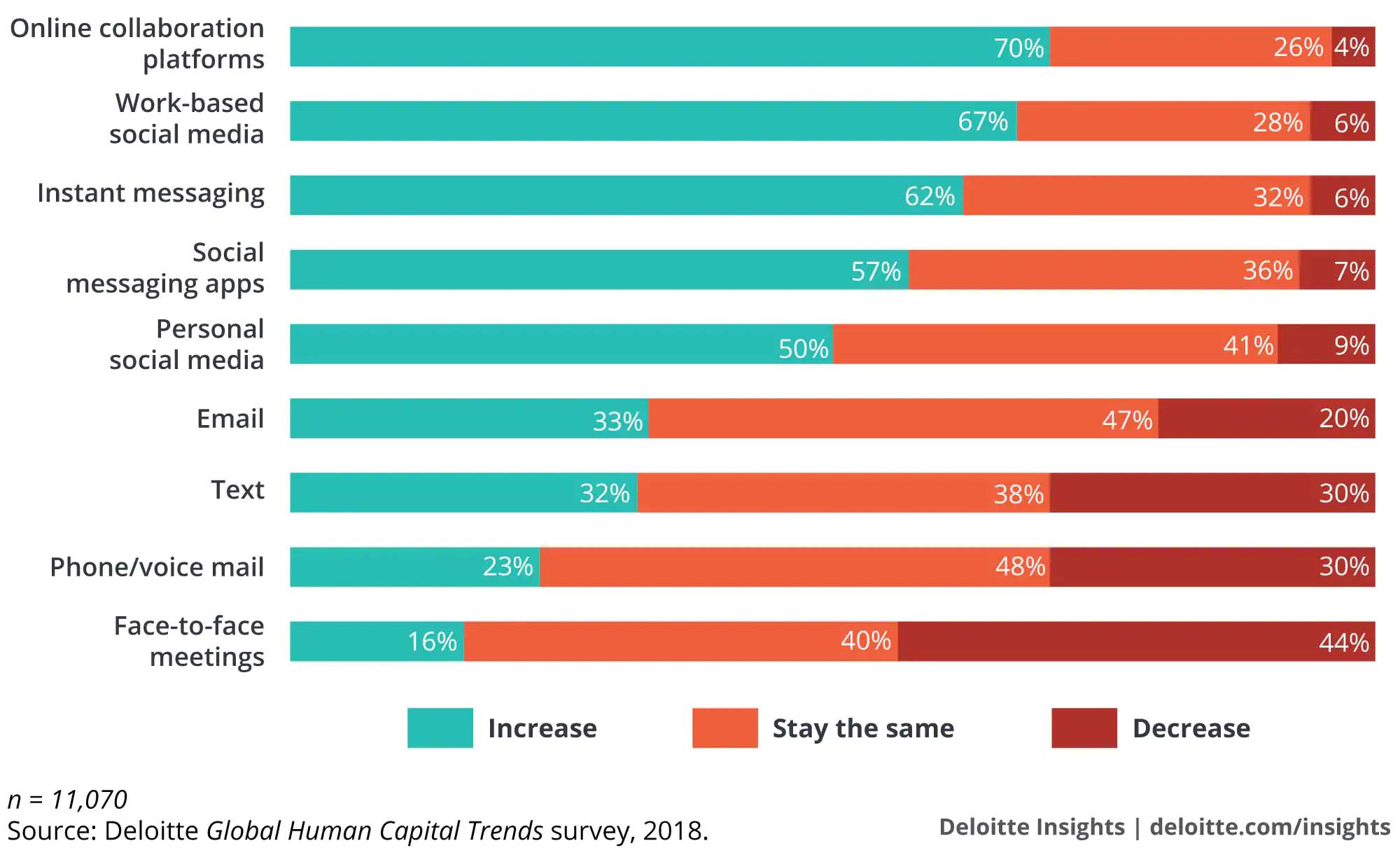

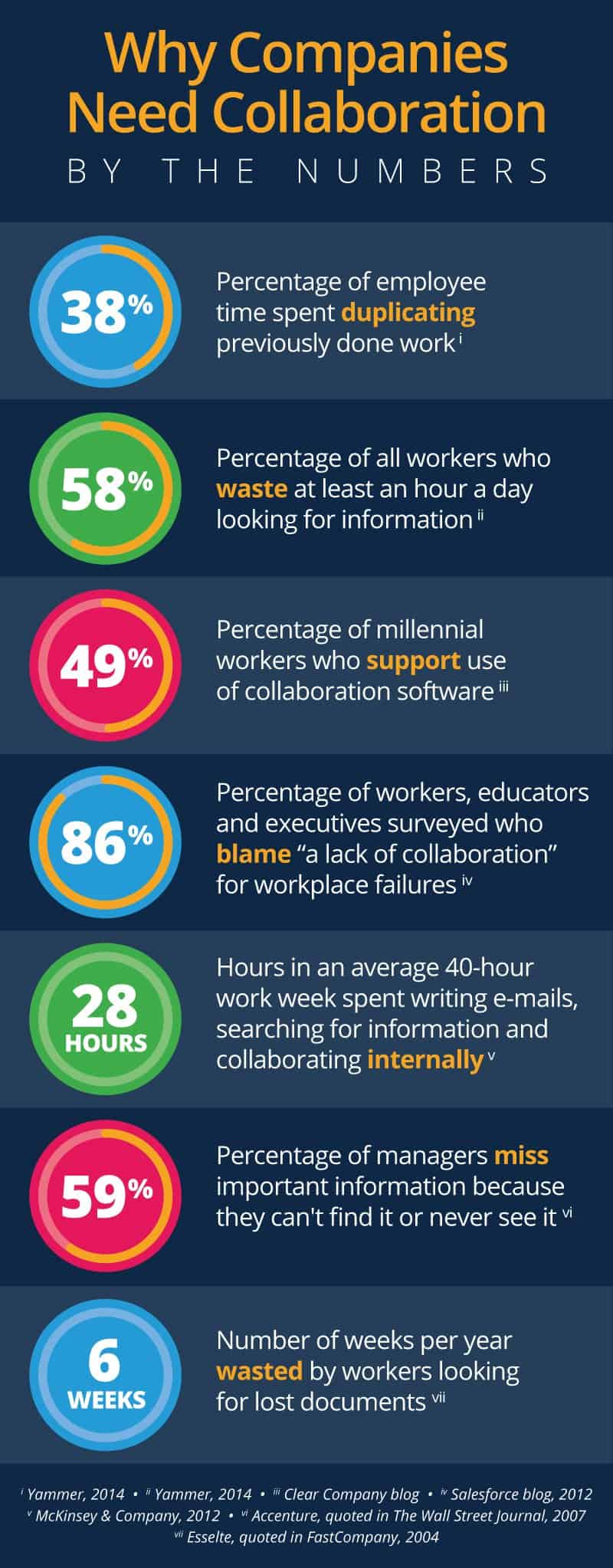
References:
https://en.wikipedia.org/wiki/Collaboration_tool#cite_note-1 – accessed on 15.02.19
https://community.box.com/t5/Collaborate-By-Inviting-Others/Understanding-Collaborator-Permission-Levels/ta-p/144 – accessed on 15.02.19
https://www.clarizen.com/blogs/clarizen-collaborative-work-management.html – accessed on 15.02.19
https://www.pmi.org/~/media/PDF/learning/pulse-of-the-profession-2016.ashx – accessed on 15.02.19
https://www.pmi.org/-/media/pmi/documents/public/pdf/learning/thought-leadership/pulse/pulse-of-the-profession-2016.pdf – accessed on 15.02.19
https://www.eztalks.com/video-conference/top-ways-to-improve-cross-team-collaboration.html – accessed on 15.02.19
https://www.eztalks.com/video-conference/online-collaboration-software.html – accessed on 15.02.19
https://www.eztalks.com/video-conference/main-benefits-of-online-collaboration.html – accessed on 15.02.19
https://hbr.org/2009/10/are-you-ready-to-manage-five-g– accessed on 15.02.19
http://www.pewresearch.org/fact-tank/2018/04/11/millennials-largest-generation-us-labor-force/ – accessed on 15.02.19
https://www.canadianbusiness.com/innovation/the-millennial-majority-workforce/ – accessed on 15.02.19
https://www.livemint.com/Specials/FOVLwKQ912P48LY3krOJpN/Collaboration-The-key-to-the-future-workplace.html – accessed on 15.02.19
https://www.alfresco.com/sites/www.alfresco.com/files/dimesional-research-collab-survey-findings-report-082415.pdf – accessed on 15.02.19
https://www.forbes.com/sites/steveolenski/2015/11/30/next-generation-of-collaboration-is-embedded-collaboration/#67cab404495d – accessed on 15.02.19
https://www.mckinsey.com/business-functions/digital-mckinsey/our-insights/advanced-social-technologies-and-the-future-of-collaboration – accessed on 15.02.19
https://uk.pcmag.com/productivity-2/70214/the-best-online-collaboration-software – accessed on 15.02.19
https://uk.pcmag.com/feature/72563/5-collaboration-trends-to-expect-in-2016 – accessed on 15.02.19
https://talentculture.com/6-eye-opening-employee-engagement-statistics/ – accessed on 15.02.19
https://www.raconteur.net/business-innovation/collaboration-is-good-for-business – accessed on 15.02.19
https://www.themarketingscope.com/productivity-the-secret-to-a-small-business-competitive-advantage/ – accessed on 15.02.19
https://www.modolabs.com/blog-post/technology-in-the-21st-century-workplace-millennials-shape-the-status-quo/ – accessed on 15.02.19
https://www.zdnet.com/article/millennials-at-work-tech-is-more-important-than-free-lunch-and-ping-pong/ – accessed on 15.02.19
https://www.inc.com/rahul-varshneya/top-20-most-influential-millennial-entrepreneurs.html – accessed on 15.02.19
https://www.forbes.com/sites/williamarruda/2017/08/02/the-surprising-thing-millennials-want-from-their-career/#6a972fe524fc – accessed on 15.02.19
https://www.forbes.com/sites/paycom/2017/03/08/the-millennial-expectation-of-technology-in-the-workplace/#5946e3b14a50 – accessed on 15.02.19
https://www.business2community.com/brandviews/magentrix/5-trends-next-generation-employee-collaboration-01628490#6DolfQK7EwV1j1xF.97 – accessed on 15.02.19
https://www.forbes.com/sites/paycom/2017/03/08/the-millennial-expectation-of-technology-in-the-workplace/#3ea694f94a50 – accessed on 15.02.19
https://www.modolabs.com/blog-post/technology-in-the-21st-century-workplace-millennials-shape-the-status-quo/ – accessed on 15.02.19
https://www.elcomcms.com/resources/guides/master-online-collaboration-in-digital-workplaces/collaboration-tools-challenges-strategies-for-success – accessed on 16.02.19
https://www.elcomcms.com/resources/blog/the-importance-of-collaboration-in-todays-workplace – accessed on 16.02.19
http://oursocialtimes.com/social-collaboration-improves-team-efficiency-by-20-infographic/ – accessed on 016.02.19
https://www.elcomcms.com/resources/blog/what-is-knowledge-management-and-why-its-important – accessed on 016.02.19
https://www.elcomcms.com/resources/blog/how-to-choose-the-best-online-collaboration-tools-for-your-needs – accessed on 16.02.19
https://www.dell.com/learn/us/en/id/press-releases/2016-07-18-future-workforce-study-provides-key-insights – accessed on 16.02.19
https://www.forbes.com/sites/benkerschberg/2019/01/29/four-critical-reasons-to-build-enterprise-apps/#73548b2e7d51 – accessed on 01.02.19
https://www.gartner.com/en/newsroom – accessed on 16.02.19
https://www.raconteur.net/business/how-collaboration-powers-productivity – accessed on 01.02.19
https://www.raconteur.net/business-innovation/top-10-communication-and-collaboration-tools – accessed on 16.02.19
https://www.clarizen.com/top-benefits-of-collaborative-work-management/ – accessed on 17.02.19
http://instituteforcollaborativeworking.com/Resources/Documents/collaborative_working_benefits_realisation_report.pdf– accessed on 17.02.19
https://www.eztalks.com/video-conference/advantages-and-disadvantages-of-online-collaboration.html – accessed on 17.02.19
https://assets.publishing.service.gov.uk/government/uploads/system/uploads/attachment_data/file/14867/Good_dataMan.pdf– accessed on 17.02.19
https://en.wikipedia.org/wiki/Data_management – accessed on 17.02.19
https://www.quora.com/Collaboration-What-are-the-best-problem-solving-platforms-online – accessed on 17.02.19
https://www.mediate.com/articles/thicks.cfm – accessed on 17.02.19
http://www.baselinemag.com/it-management/slideshows/issues-with-collaboration-tools-cause-frustration.html – accessed on 17.02.19
https://www.quora.com/What-are-the-biggest-problems-facing-all-modern-online-collaboration-tools– accessed on 17.02.19
https://www.wrike.com/blog/6-challenges-team-collaboration/ – accessed on 17.02.19
https://www.elcomcms.com/resources/blog/the-importance-of-collaboration-in-todays-workplace – accessed on 17.02.19
https://www.raconteur.net/business-innovation/how-collaboration-powers-productivity – accessed on 17.02.19
https://www.raconteur.net/retail/digital-tools-giving-power-to-customers – accessed on 17.02.19
https://www.elcomcms.com/resources/blog/the-importance-of-collaboration-in-todays-workplace – accessed on 17.02.19
https://community.box.com/t5/Using-Shared-Links/Creating-Shared-Links/ta-p/19523 – accessed on 17.02.19
https://redbooth.com/blog/8-business-problems-the-best-collaboration-software-can-solve – accessed on 17.02.19
https://hbr.org/2008/12/which-kind-of-collaboration-is-right-for-you – accessed on 18.02.19
https://financesonline.com/collaboration-software-analysis-features-types-benefits-pricing/ – accessed on 18.02.19
https://biz30.timedoctor.com/online-collaboration-tools/ – accessed on 18.02.19
https://study.com/academy/lesson/what-are-collaboration-tools-definition-types-quiz.html – accessed on 18.02.19
https://en.wikipedia.org/wiki/Collaboration_tool – accessed on 18.02.19
 Digital Marketing Level 4