Unit 16 Video software
Presentation https://prezi.com/dashboard/next/#/details/ykvfikz4q6r9
Unit 16.2 Use video hardware and software to capture sequences
Introduction
Unit 16 video software is a more practical based unit which focuses on addressing the use of equipment and software such as Apple, YouTube and Adobe to create, edit, produce and troubleshoot the creation of a full length video that can be hosted online. It also included looking at wider considerations attached to this i.e. copyright, audience, quality and functionality.
The unit was more creative and practical based, this meant that uses of references from the internet or textbooks were more tutorials and instruction based to understand and perform the principles needed to produce a video.
It is worth noting that there were restrictions in terms of the video i could produce, this was due to limitations such as cost and compatibility of software to equipment used.
This included:
- Apple iPhone 6s
- Apple Macbook (2012)
- QuickTime player
- Photoshop
- YouTube
Each question acted as a sequence for collectively producing the overall final cut.
Unit 12 explored the areas of:
Selecting appropriate software and equipment.
The initial stage of starting video production is selecting compatible software and equipment, this is dependant on the parameters set by a person or company in terms of budget, required effect, device display and skill set. These factors of course can act as benefits or constraints in terms of the end product.
Editing and adding effects
Many of the questions required you to demonstrate and explain how to edit and alter the original video, this is important as it essentially provides an understanding of techniques used by professionals in which films, adverts and blogs are produced in order to engage an audience and create a sense of escapism of reality, as well as ensuring fluidity. For me this included adding music, colour and superimposing imagery.
Most of the effects and edits were made using Photoshop as it produced the highest quality and variety of specialised tools in order to create the required effects.
Copyright and legal requirements
Copyright and legal requirements accounted for 1/3 of the questions in unit 2. After researching the topic it became apparent how much it underpins and regulates the industry. This is an interesting debate as to the primary reasons and moral judgement on why this is. I plan to research examples from past copyright lawsuits to uncover the reasons, processes and outcomes of these cases providing examples from the video industry.
The questions also ensure that as a precursor to posting the videos online I will follow the required protocol so not to infringe any laws, I plan to use YouTube as my platform so will be using their terms and conditions and support content as a means in which to reference and action the information gathered.
Technical and Troubleshooting factors
Unit 3 explores software, displays and the more technical factors to producing a video. This will navigate me to the use of the internet more for references; opening up new considerations as well as highlighting important areas in which to introduce and get accustomed with.
Understanding the technical requirements of producing a video branches out into various considerations, both personally and addressing the target audience. This includes equipment and software capabilities (i.e. the quality of production, compatibility of format) and can extend to wider areas such as if it can render onto the variety of displays in the market i.e. mobile phone screens, 4k displays, Microsoft vs Macs.
In the unit and summary I will demonstrate and evaluate the difficulties that arose and how these were identified and solved through information found online as well as using prior knowledge to software such as Photoshop.
2.1 Select and use appropriate video software tools and techniques to mark up and edit sequences to achieve required effects
The software used to create and edit my video sequence included QuickTime player, Photoshop and YouTube.
I filmed the sequence using an Apple iPhone 6, which provides a 12 megapixel camera and 4K video recording at 30 fps -frame per second*.
*4K provides a higher pixel quality on compatible displays. FPS is equated on frames per second. The more frames, the more fluid the video will be, 30 being the recommended standard for basic video footage.
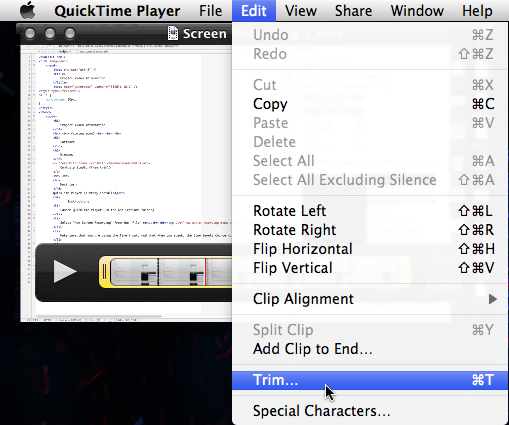
I then imported it into my Mac and opened using Quicktime player.I wanted to trim some of the content out so used the trim option within Quicktime, then pieced the remaining sequence together so the video played fluid and consistent.
Next i opened the video sequence using Photoshop.

Within Photoshop i designed and created a PSD halftone graphic and edited into the video to appear at the end.The video tools and techniques used included:– Resolution – changed to 100% to display better on devices– Trim to shorten and cut some of the sequence out of the video– Cross fade – to fade from video to PSD file– Convert to smart object (to apply effect within the PSD file)– Image – Adjustments – Invert – to apply invert effect into a section of the videoA lot of the above tools and techniques are used by myself in order to create or edit imagery, and so proved an effective way in order to further design and edit the video, it was also useful to cross reference information found online on Photoshop tools effects and use for the video.I actively researched other techniques which included Trim, Cross Fade and Resolution as ways to further edit the video.Then I exported and rendered into a video to convert and save it later to upload into YouTube.Here was the end result:
References
https://support.apple.com/en-gb/HT201066
https://www.digitaltrends.com/web/how-to-upload-a-video-to-youtube-guide/
2.2 Provide guidance on how copyright constraints affect use of own and others’ information
Copyright is a legally binding agreement which protects a person’s or companies content from being shared, used or sold by others. It ensures and acknowledges that you have full ownership of what has been produced and performed.
I looked at prevention in more detail I researched examples online to provide examples of how each of these could or have been used to infringe copyright laws.
Copyright prevents others from:
Sharing or selling copies of your work
With advances in Digital t i.e. camera and film quality, YouTube and other uploading sites, there has seen in rise in sharing media content online illegally, this is known as piracy. As a result it is not unusual to see a message displayed prior to the cinema performance to warn viewers that the process is illegal and the consequences of sharing without rights.
One of the biggest examples of piracy came from Pirate Bay which went through a 7 year legal battle to expose and prosecute their website from illegally sharing content. This was eventually closed and since then, regulation of sharing websites or torrents as they are also know as have been monitored and shut down and fined.
Performing, showing or playing your work
Popular examples of copyright infringement for performances circulate around music. Many of the cases stop other musicians from playing their songs either during a live concert or version of it on an album without the agreement of the original creator. One example of this comes from the Beach Boys who incorporated Chuck Berry’s songs into their earlier live performances, changing lyrics to be more suited to Californian living. After threats of plagiarism the songs were later credited to Chuck Berry.
Ownership or copying features of a licensed product as your own
A major copyright case includes Dyson Vs Hoover. Dyson patented the bagless vacuum cleaner as his own which Hoover added to their next range and marketed it as the triple vortex. The High Court ruled that Hoover had intentionally copied the technology and so could not sell products referencing to being bagless.
In terms how Copyright works for personal right Gov.uk advices that an individual or company automatically get copyright protection if they create or produce the following:
- Software, web content and databases – for example an app or website that has been coded from scratch not using pre brought templates.
- Sound and music recordings – after doing research on their website, sites such as SoundCloud advise that music; once created is automatically protected.
- Film and Television recordings
- Drama and Theatre performances
It is important to note that these are only protected if the work is actually created and posted or performed live, you are not covered if an idea is copied.
There is also a website which provide more certified assurance to protect your work. https://www.copyrightservice.co.uk/
Companies such as as YouTube will monitor content and take action if they see any copyrighted material, however this is usually for larger scale productions and companies. For ones individual work, if you are suspicious of copyright infringement you are advised to report it to the copyright tribunal.

References
https://www.youtube.com/intl/en-GB/yt/about/copyright/fair-use/
2.3 Organise, combine and link information for sequences in line with any copyright constraints, including across different software
I’ve edited my video in Photoshop and added the track “true colours” in the background, this is protected under Copyrighted law. To ensure i do not breach any copyright laws i researched the copyright agreement which recommends the following:
How can I legally use copyrighted music on YouTube?
When you get a third party content claim YouTube suggest you do one of the following:
- Acknowledge it. If you don’t mind the ads, you don’t have to do anything.
- Remove or swap the music.
- Share revenue. If you’re a partner you can share revenues for song covers.
Following these rules i have made an acknowledgment on the video upon posting

To remove any further doubt or constraints YouTube provide the option to add music from their dedicated library, this includes an eclectic mix of music which compliment the affective mood or atmosphere in which the video is targeting. All tracks are copyright approved.
This was edited into the video using the software provided by YouTube, I then saved the changes so this will show online.


References
https://www.theverge.com/2013/9/25/4769332/youtube-audio-library-launches-150-royalty-free-songs
Unit 16.3 Play and present video sequences
3.1 Explain the features and constraints of playback software and display devices as appropriate for different purposes.
The features
Websites: Videos within websites are usually used for advertising or entertainment purposes, i.e. YouTube and ASOS who focus on a mobile first strategy so products and content will be optimised to view especially on phones then laptops and desktops.
Features for playback are minimal and usually based on time and cost restrictions so are recorded and edited using lower budget equipment, this included the use of higher end phones, digital cameras and using free or inexpensive software like Photoshop.
Specific features for typical recording equipment:
Typical high end cameras:
iPhone/Samsung and high end digital camera:
Camera: 12 Megapixel, Video capture: 4K
Constraints for lower end budgets and times for the current digital landscape include the ability to ensure the video and the desired quality can be viewed on a multitude of display devices and operating systems – this is usually controlled within the code and so is the responsibility of the developers.
TV broadcasting/Cinemas: TV broadcasting is more focused on larger productions i.e. documentaries, dramas and films for larger audiences which are viewed live or through recordings (i.e BBC Iplayer). These require more sophisticated equipment such as film cameras, lighting, software and audio software.
This equipment includes features such as:
4k ultra hd cameras – 4k ultra is characterised by the pixel density, which has a minimum of 3840×2160 pixels this means the quality will render onto larger screens and maintain the high quality picture generated by it.
External Microphones – Smaller scale video equipment such as phones have internal microphones which are less able to maintain or render sound recordings when playback. External Microphones have a higher ability to process sound waves to significantly improve quality of the recording.
Budget and time allowances for larger productions tend to be higher/extensive compared to those of digital companies (websites).
Constraints for higher productions include:
Time to finish production – i.e. Longer edit time
Expense: Equipment used, Staff, Software, Publication and copyright.
References
https://www.desktop-documentaries.com/video-production-equipment.html
3.2 Select and use an appropriate combination of video playback software and display device to suit the file format
The video was filmed using an Apple iPhone 6s video camera, the specs include a 12 megapixel camera and ability to shoot a high definition 4K video display which means higher pixel quality.
I then imported it into my Mac and using QuickTime player saved as a MP4 file to suit YouTubes compatible formats these were found on the support pages on Google.

Next i imported into Photoshop, which have various resolutions to playback video. The default is 50% and other options are 25% and 100%. A lower resolution provides better playback on high resolution videos since it is less demanding on the size and quality and provides more fps.

The Loop Playback check box is also selected to ensure a better quality display for the file format .MP4.https://www.youtube.com/watch?v=OCr1r6UjJY4&feature=youtu.be

References
https://support.google.com/youtube/troubleshooter/2888402?hl=en-GB
https://support.apple.com/en-gb/HT201066
https://www.digitaltrends.com/web/how-to-upload-a-video-to-youtube-guide/
3.3 Present sequences effectively by exploiting the features and settings of playback software and display device to maximise quality and meet needs
You can alter playback for display devices using QuickTime player, this can be found under File > Export > which presents various options on different displays to select.

Next using Photoshop i was able to change features and settings to suit other display device settings.
This included the following:
Format – The options include DPX (Digital Picture Exchange) which is commonly used in the TV and movie industries.
H.264 which is used for consumer products such as TVs and mobile devices, website like YouTube.com and Vimeo.com also display using this format.
QuickTime format is used by desktop video programs and is needed to export videos with a focus on audio
The default is H.264 which i leave it as, since its the most suitable and popular format for posting online to a wide user base.
Size – This renders what the physical size of your video will be when played back. The default is set to the size of the document upon exporting which means the dimensions will match the pixels set when i created the video, so will not alter the quality, Photoshop does offer alternative sizes, such as sizes that will fit many different devices and TVs.
Frame rate – Frame rate describes the amounts of images which are presented per second, almost like a flick book, the more images per second the more fluid the picture will be, for this reason I increased the frame rate from 15 to 30 which is the recommended amount for high quality visuals
Range
Range allows you to set if you want the video playing in it’s entirety or set it to start or finish a particular points. I would like to output it in its entirety. so i left it set at All Frames.

References
https://support.apple.com/en-gb/guide/quicktime-player/export-movies-qtp20e395859/mac
https://helpx.adobe.com/uk/photoshop/using/saving-exporting-video-animations.html
3.4 Evaluate the quality of sequences and explain how to respond to quality issues and problems.
Quality issues can come from a variety of causes, some for example may be technical i.e. capacity of the computer, graphic ability, storage or software used.
However depending on these there are ways in which to adjust preferences to balance and resolve quality issues and problems.
I used software Photoshop, After effects and Premier Pro to demonstrate how to fix various issues i had during the project
Dimension conflicts – Premier Pro
Premier pro automatically scales videos to the original size. I imported two separate videos to combine together which conflict in dimensions: 4K vs Standard. a 4K resolution is a resolution of 3840 x 2160 or higher. You can check this under the “info” tab. To match resolutions I went to effect control and selected uniform scale which unifies both resolutions to match.

Unsteady footage – After Effects
There were some parts of my video that were unsteady, after using Google to resolve i used their advise to use the tool Warp Stabliser this can be found under Effect > Distort
It offers the following to reduce motion
- Result: Smooth Motion – which works best on footage that is physically moving. No Motion works best on footage where the camera is still i.e. on a tripod – I choice Smooth motion as it was done freehand.
- Smoothness: The higher the number, the more stable the footage will be
- Method: This includes Subspace Warp which applies stabilisation to each pixel in a frame. This didn’t resolve the issue, so i chose the default method Positionwhich is meant for more basic footage.

Fix Colour / Exposure – Photoshop
I noticed that my video was a little dark and discoloured when i uploaded into Photoshop.
I was able use the tools and features under Photoshop menu Image > Adjustments > and increase the lightness and contract and balance the colour.
For the changes to be applied to the entire video, I also had to convert the video into a Smart Object.


References
https://helpx.adobe.com/uk/premiere-pro/using/stabilize-motion-warp-stabilizer-effect.html
https://helpx.adobe.com/premiere-pro/using/color-correction-adjustment.html
https://helpx.adobe.com/premiere-pro/how-to/merge-mixed-footage.html
Conclusion
Thoughts on video production and industry requirements…
Starting the unit I initially went through the preparation phrase in terms of researching the best place for me to begin. Video production and software as a whole lay on a wide spectrum in terms of its uses and requirements, this can range from uploading a video onto free and peer to peer websites such as Facebook, YouTube and Instagram, then range up to TV and even cinema production.
Depending on these factors this alters the context, skill set and equipment needed. For example, using Photoshop for me was effective for social media posting, however would probably not be as sufficient for producing a movie, in which software such as Premiere Pro may be more fit for purpose. This is due to the restrictions in tools and effects available as the technical requirement and knowledge of features and quality are heightened.
Video software can be used according to the target audience and the skill set required which can range from a child with limited technical equipment all the way to large screen cinema productions.
What was interesting for me was exploring the ubiquity and dominance that video platforms now have as a use of entertainment over conventional and traditional mediums such television. Video now becoming utilised more as the standard form in which people, media and businesses advertise, connect and communicate to the masses.
It is forming a more creative and self governed means of entertainment and information over relying on media based constructed content hosted by corporations such as BBC and Sky. YouTube, being one of the most popular video platforms, highlights the popularity and range of content available and being shared in the digital age.
Because of the availability of online posting it tied in closely with the questions on Copyright restrictions as well as regulating misinformation and how this is managed. Essentially we are witnessing more freedom of expression.
Summary on questions..
From starting this project being a novice and somewhat intimidated by the questions, I found the use of video software to be very accessible to my requirements and intuitive from uploading to the computer to editing and uploading. When I did want to find out further and more skilled information; online provided a solid understanding of best practices for considerations brought up.
Selecting appropriate software and equipment.
The initial stage of starting video production is selecting compatible software and equipment, this is dependant on the parameters set by a person or company in terms of budget, required effect, device display and skill set. These factors of course can act as benefits or constraints in terms of the end product. For my own circumstance I was limited to using software that was either free and can be used on my MacBook (OS v 10.4) or software I have already subscribed for (this being Photoshop and Illustrator).
In terms of compatibility for answering the questions in Unit 16, I found that the free software available (QuickTime, YouTube) and Photoshop allowed me to effectively demonstrate the requirements asked to my limitations i.e. uploading, editing and posting online.
Editing and adding effects
Many of the questions require you to demonstrate and explain how to edit and alter the original production of the video, this is important as it essentially provides an understanding of techniques used by industry and professionals in which films, adverts and blogs are produced in order to engage an audience and create a sense of escapism, consumption as well as ensuring a fluid and captivating finish. For me this included adding music, colour and superimposing imagery.
Most of the effects and edits were made using Photoshop as it produced the highest quality and variety of specialised tools in order to create the required effects. What was also useful about Photoshop was the familiarity of using the same effects and methods in video editing as in photo and image creation.
The internet also provided a valuable resource in providing information as well as tutorials to build my ability and proficiency. I found peer to peer advise came suitably from users posting videos on YouTube as well as blog posts. Also, company websites such as Adobe provide comprehensive guides via their support pages.
There are also paid facilities available such as Lynda.com or Skillshare which for a monthly price which give access to ‘how to’ lessons hosted by professionals in the industry.
Uses and reasons for adding effects and manipulating videos.
Looking into the industry and practising editing techniques allowed me to think a little deeper as to how broad the reasons and uses for editing can be. This opens up the debate of ‘is what we perceive online reality’
I have selected two dominant topics below.
Imagery
This includes videos of objects or people i.e. adverts, user blogs, photographs.
These techniques are mainly used by the entertainment industries for films, music videos and animation). This way in which to enhance video has been a progressive movement and is now the market standard. Video editing techniques have taken a lot of the tactile craft i.e. prop making, special effects and free hand illustration roles but instead have transferred these skills into the digital realm, saving heavily on cost and time. The end effect also being one in which it is hard to decipher what is real and what is not.
A good example of how effective video editing has been in the film industry is Toy Story, which was the first full feature length film to be created by video software. The film grossed over £192 million pounds at the box office.
It can also be used in which to be less explicit and includes more nuanced editing effects created by individuals or companies. This can include for example; trying to show effects of whitening toothpaste which can be enhanced via tools found on Photoshop or other video editing software. For my video I was explicit with adding effects – adding a sharp contrast of colour, however; say for example I wanted to sell the Apple, I could make it more appealing through altering the colour and texture.
Information
As stated in the introduction, videos are now becoming the dominant medium in which to share information and entertainment. This is allowing more freedom of speech but also opening up more questions as to what is real and what is false information.
Editing furthers this, for example conspiracy theories can be exaggerated through editing imagery to look untainted. Video platforms have been under increased pressure recently to regulate videos hosted online due to a surge in exploitative and falsified information posted online.
Copyright and legal requirements
Unit 2 looked into Copyright laws and restrictions. I researched previous case studies on copyright lawsuits which circulated around ownership and who profits from the material. Economic gain is the dominant factor in why Copyright laws exist, however there are also cases for acknowledgement where there is only reputation to be made.
When producing videos it is imperative you ensure any music, influences and style are covered by law or are acknowledged within the production. Failure to do so can have serious consequences especially if your video is produced for financial consumption.
Within my presentation I included 3 case studies in which to demonstrate why a copyright case was opened and the outcome of the progress. This looked into the film industry and the increasing pressure in which to modulate websites and content for illegally sharing or copying content.
One of the references from the Guardian came from the 2017 case of Pirate bay, one of the first websites in which your could share and access content. After 7 years the company was finally closed down and fined from their involvement. What was unique about Pirate bay was the more sophisticated methods used to give users access to Copyrighted media – instead of hosting directly, they instead provided links and information of where to find, making their involvement less explicit.
Technical and Troubleshooting factors
In the introduction i explored the potential barriers which may rise within the unit, evaluating both hardware and software considerations in which technical and troubleshooting complications may be encountered.
Troubleshooting factors allowed me to explore how to overcome these barriers; one benefit being the huge access to information available for free online; delivered through peer to peer communities and companies support pages like Adobe or YouTube.
The questions within the unit were practical based and asked for both analysis and demonstrations on how to fix the issue. I actually didn’t experience too many technical complications during the production of the video, however created a lot of “as if” issues, injecting ways to enhance my video through looking at quality complications.
I also used a variety of software including Photoshop and Premiere pro to troubleshoot errors. These included issues such as colour, film stability and pixel / display quality. I included imagery within the answers to demonstrate the steps i took to reconcile these areas. As mentioned above a benefit was the wealth of information available online, being a beginner I found the amount of advise, clarity and context easy to follow both in written and video form.
Troubleshooting also extended into considerations around hardware i.e. how to ensure videos render onto a variety of displays. This included changing dimensions to suit both 4K and standard resolution to ensure picture quality is consistent.
Other hardware issues included simply freeing up space within my computer and phone to ensure i could shoot the video and freely edit and upload.
 Digital Marketing Level 4